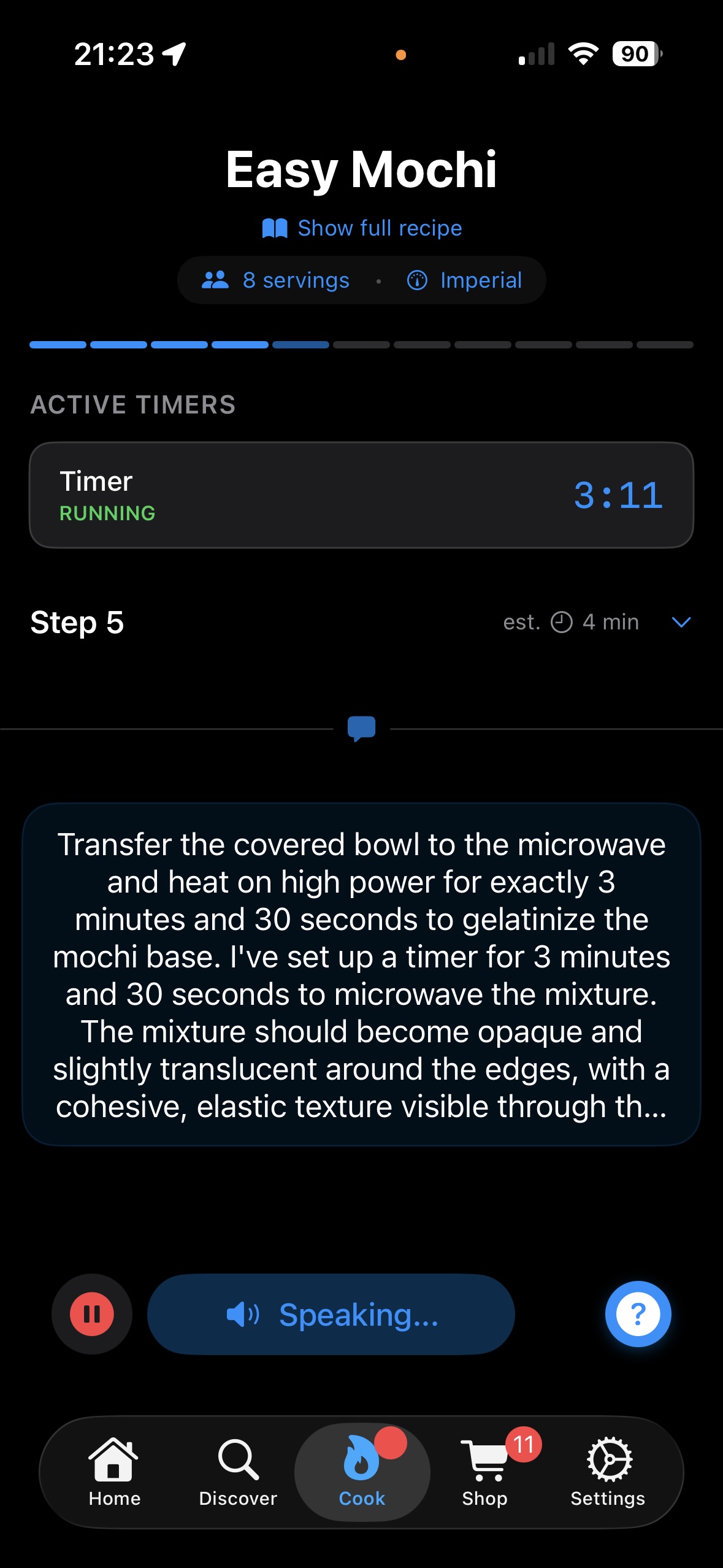
With voice guidance that breaks down complex steps into clear single actions, adds safety tips, sensory cues (how it should look, smell, feel), automatic timers, and adapts to your skill level.
Import recipes from anywhere, Instagram, Pinterest, YouTube, or any of your favorite food blogs and recipe websites.
Cook hands-free and never feel lost in the kitchen again.
Traditional recipe apps leave you constantly looking at your phone. ChefTalk gives you the freedom to cook naturally with your hands free.
Just say "Hey Chef" and get instant guidance. No more sticky fingers on screens or pausing to read instructions.
Whether you're a beginner or expert chef, ChefTalk adjusts instructions to match your cooking experience.
Share directly from Pinterest, YouTube, or your mobile browser. Works with 500+ recipe sites and cooking blogs.
Automatically generate shopping lists from any recipe with one tap. Never forget an ingredient again.
ChefTalk sets and manages multiple timers automatically, so you never overcook or burn anything.
ChefTalk tells you what to look for, smell, and feel at every action. "The onions should be golden and smell sweet." "The dough should feel smooth and elastic." Cook with confidence.
Learn how ChefTalk compares to traditional recipe apps and AI voice assistants like ChatGPT, Claude, and Gemini
None
Answer questions when asked
Proactive step-by-step coaching
Imagine driving without navigation apps, constantly glancing at directions, losing your place, missing turns. Traditional recipe apps work the same way. You're constantly stopping mid-stir to check "What's next?" instead of focusing on the road ahead.
Just like navigation apps, ChefTalk gives you instructions exactly when you need them. Making carbonara? ChefTalk proactively tells you "Start heating pasta water now while you prep", no need to check the recipe or ask.
Your attention stays where it belongs: on the sizzle, the aroma, the texture. Not on managing the recipe.
Full recipe steps paragraphs
Explains if you ask
Automatically breaks complex steps into single actions
Recipe developers must compress dynamic cooking processes into static text. Mary Berry's coffee fudge recipe packs 13 distinct actions into one paragraph-sequential steps, simultaneous tasks, and judgment calls all bundled together.
You're left decoding what to do when while managing everything at the stove.
ChefTalk breaks that same paragraph into a guided sequence: "Place the butter, sugar, and milk in your small pan, let me know when you're ready." Then: "Great, now start heating on low heat and stir until the sugar completely dissolves."
Each action gets your full attention. No more mental juggling.
No - must touch screen
Yes - Reactive
Yes - Proactive
Voice AI assistants like ChatGPT work hands-free, but require you to ask for each step. "What's next?" "How long should this cook?" "What do I do with the garlic?" You're managing the conversation while cooking.
ChefTalk guides you through the recipe without constant prompting. The app tells you what's next and keeps you moving through the workflow. Your voice is for confirmations and questions, not requesting every instruction.
Your hands stay on the food. The recipe guides your workflow.
Manual - touch screen or use separate timer
Manual - you must ask
Automatic for every relevant action
You're making risotto. The recipe says "simmer for 20 minutes, stirring occasionally." You have to remember to set a timer yourself, whether that's tapping your phone screen with messy hands, asking a voice assistant, or using a separate kitchen timer. You're responsible for tracking time.
With voice AI, you can ask for timers hands-free: "Set a timer for 20 minutes." But you must remember to ask for each one. If the recipe has multiple timing steps, you're managing the conversation: "Set another timer for 5 minutes," "Cancel the first timer," "How much time is left?"
ChefTalk reads the instruction, identifies the 5-minute simmer, and automatically sets a timer. You hear: "I've set up a timer for 5 minutes to monitor the simmer." No asking, no touching screens, no forgetting. The app manages timing so you can focus on the cooking.
Never miss a timing cue. ChefTalk handles it automatically.
Must scroll/track yourself
Tracks via conversation
Tracks exactly where you are in recipe
You're 30 minutes into cooking when the phone rings. When you return, you're staring at a long recipe trying to remember: "Did I add the garlic yet? Was that step 4 or 5?" You scroll up and down, reconstructing where you left off from memory.
Voice AI remembers what you've told it in the conversation, until the conversation gets too long. "I just finished browning the meat" updates its memory, but you must verbally communicate each stage. After enough back-and-forth, it may forget you added the garlic 20 minutes ago.
ChefTalk knows exactly where you are in the recipe. When you ask "Did I already add the garlic?", it checks what you've completed and tells you definitively. When you say "next," it knows which action comes next based on your actual progress, not assumptions.
ChefTalk remembers what you've done so you don't have to.
None
Provides if you ask
Built into every instruction (look, smell, feel)
The recipe says "cook for 5 minutes, stirring constantly." You stir and watch the clock. But what should be happening during those 5 minutes? Is it cooking correctly? Recipe apps tell you what to do, not what to look for.
You can ask: "What should the risotto look like after 5 minutes?" Voice AI will explain it should be creamy and thickened. But you have to know to ask. The sensory details aren't part of the original instruction.
ChefTalk doesn't just say "cook for 5 minutes." It tells you: "Mixture should become creamy and slightly thickened. Listen for a gentle simmering sound." Every action includes what to see, hear, and feel. You learn what "right" looks like.
Know what to look for, listen for, and feel at every step.
One recipe fits all
General advice if asked
Adapts instructions to your level
The recipe says "dice the onions" without explanation. Beginners google what "dice" means. Experienced cooks already know. Everyone gets the same static text, regardless of whether they need detailed instruction or just want efficiency.
You can tell voice AI "I'm a beginner" and ask it to explain techniques. It'll provide general cooking advice tailored to your stated skill level. But you have to explicitly request adjustments for every question. The default responses don't automatically adapt.
Every instruction automatically adapts to your skill level. Beginners get "dicing means cutting into small, even cubes about 1/4 inch in size" with safety reminders and encouraging feedback. Experienced cooks get concise professional language like "dice the onions uniformly for even cooking" with quality-focused guidance on achieving precise cuts. The tone, detail level, and terminology shift to match your expertise.
Instructions that grow with your skills, not against them.
None
If you ask
Contextual tips at relevant actions adapted to skill level
You're expected to already know kitchen safety practices.
Can answer safety questions if you ask, but won't warn you proactively.
ChefTalk automatically provides safety reminders to beginners at the exact moment they're needed. After cutting raw chicken: "Wash your hands thoroughly with soap before touching other ingredients." Before adding ingredients to hot oil: "Pat vegetables dry to minimize splatter." When using a pan on the stove: "Turn the handle inward to avoid bumping it." The guidance is contextual to the specific action, adapted to your skill level, and delivered without you needing to ask.
Safety tips that appear exactly when you need them, not after something goes wrong.
Built-in or imports
Generates recipes (unreliable)
Imports from trusted sources
Ask for "chocolate chip cookies" and you'll get a different recipe each time, because AI generates recipes probabilistically, not from tested sources. The same prompt produces different ingredient ratios, baking times, and techniques. AI confidently suggests combinations that have never been tested in a real kitchen, trained on internet data that includes both professional recipes and untested experiments.
Non-deterministic output means you can't trust the same recipe twice.
ChefTalk imports recipes from anywhere, Instagram, Pinterest, NYT Cooking, your favorite food blog. You're not limited to a curated catalog, but you choose sources you trust. Found a recipe from a chef whose work you love? Share it to ChefTalk and cook it with full voice guidance. The recipe comes from a human who tested, adjusted, and validated it, not from a probability model.
None
General Q&A
Cooking-specific, contextual to current step and skill level
Static text and images. No ability to ask questions or get clarification.
You can ask anything, about satellites, medical issues, gift ideas, cooking techniques. The conversation isn't focused on your recipe or current cooking task. It's a general-purpose assistant that happens to know about cooking, not a cooking-focused assistant that keeps you on track.
ChefTalk identifies cooking intents and maintains context about your recipe, current step, ingredients used, and skill level. Ask "Is this enough salt?" and it knows you're making pasta sauce in step 8, considering the tomatoes you added earlier and your beginner skill level. Ask "Can I substitute this?" and it knows what ingredient you're referring to based on the current instruction. The conversation stays focused on the cooking task at hand, giving you relevant answers without wandering off-topic.
Answers that understand where you are in the recipe, not just what you asked.
We meet recipe developers wherever they publish.
Found an amazing recipe on Instagram? Spotted something delicious in the NYT Cooking app?
Discovered a talented creator on Substack, Bluesky or Pinterest?
Share it with ChefTalk and cook it with full
voice guidance.
Cooking tips, app updates, and insights to help you cook with confidence
Loading latest posts...
Things you should know about ChefTalk
You can install ChefTalk immediately on your iPhone or iPad. We use Apple's TestFlight for beta distribution. What is Apple TestFlight?
Currently available for iPhone and iPad only, distributed through Apple TestFlight. Android users can sign up with their email to stay updated about availability.
Yes. Beta access is completely free with no hidden costs.
No. We perform speech-to-text conversion directly on your device. Only the text is sent to our servers for processing - never your actual voice recordings.
No. We believe AI-generated recipes are unreliable and potentially unsafe. ChefTalk only works with real recipes from trusted sources. Read more about our stance on AI recipes.
ChefTalk works with 500+ recipe sites including AllRecipes, Food Network, BBC Good Food, and most major cooking blogs. Found a food blog that's not supported? Let us know through the feedback page in the app and we'll add it quickly!
Voice guidance requires an internet connection, but you can view saved recipes offline.
Join the cooking revolution. Get early access to ChefTalk and never feel lost in the kitchen again.
Not currently on iPhone or iPad? Get an email invitation